Building Generative AI applications with Preservica using Webhooks
02 Feb 2026Unlocking Automation with Preservica Webhooks
In the world of digital preservation, automation and interoperability are key to building scalable, responsive workflows. With the introduction of webhooks in Preservica v6.8, organizations now have a powerful tool to trigger real-time actions based on repository events—without the need for constant polling.
What Are Preservica Webhooks?
Webhooks are event-driven HTTP callbacks. When a specific event occurs in Preservica—such as an asset being ingested or moved—the system sends an HTTP POST request to a pre-configured URL. This allows external systems to react instantly, enabling seamless integration and automation.
Unlike traditional APIs that require clients to poll for updates, webhooks push data out as events happen. This shift from pull to push architecture is ideal for building responsive, scalable workflows.
For more detailed information on Preservica webhooks we have a previous blog post.
Generating the webhooks takes place automatically from Preservica; to build applications we need infrastructure to consume the webhook and take actions based on the information sent by Preservica.
In this blog post we are going to describe how we can build applications that use Amazon Web Services (AWS). AWS is a good choice for consuming webhooks due to its scalability, reliability, and rich set of services that make it easy to build secure, event-driven architectures. We showed how we can easily deploy a serverless application using AWS Lambda and API Gateway to consume Preservica webhooks.
The AI Application
The application we are going to build is designed to support a key responsibility of an archivist, that is the creation of document descriptions in Preservica to support the creation of finding aids and catalogue entries of historic material.
Good descriptions help researchers, and the public understand what the documents are, why they matter, and how to access them.
Archivists may often write summaries, historical notes, or contextual essays to help non-specialists understand the
significance of the materials and supporting that process through AI can reduce the workload of the archivist.
The aim of this webhook application is to update Preservica with descriptive metadata about digitised documents automatically as they are ingested into Preservica.
The descriptions will be generated using what is called a foundational inference model, the model will be supplied both the text of the document and a prompt, the prompt will be some request we would like the model to carry out. For example, we could ask:
“Create a two-paragraph archival description of this document for use in an archive”
We would send both the prompt and document text to the model.
The model will be executed within a secure managed framework called Amazon Bedrock, which will let us try out different models from leading AI companies and Amazon through a unified API.
Bedrock then returns the result which in this case is a two-paragraph description of the document which is then sent to Preservica.
One extra step we are going to include is a request to OCR the digitised documents, this will extract the text from within the image, without this step we will not have any input to send to the AI model. The OCR step is going to use the AWS Textract, this service allows us to send a image of a document and retrieve the text within the image.
To orchestrate the whole process, we do need a small amount of glue code which will fetch the document from Preservica, send the document text to Bedrock and send the final result back to Preservica. To provide this glue code we are going to be using AWS Lambda.
AWS Lambda is a serverless compute service provided by Amazon Web Services that lets you run code without provisioning or managing servers. This is useful because we do not need to deploy or run any servers to build this application.
AWS Lambda supports multiple programming languages, for this example application we are going to use Python this allows us to make use of the 3rd party Preservica SDK pyPreservica library for interacting with Preservica and the AWS Boto3 library for making requests to AWS services. For more details on how to build the Lambda function and deploy it using Zappa see the blog post.
The last part of the application is a web service which will receive the webhook requests from Preservica and trigger the AWS lambda code to start the process.
The component we are going to use for this is AWS API Gateway.
API Gateway is going to acts as a front door for our application, it will provide the URL which we need to
configure the webhook in Preservica and will validate requests and trigger our Lambda function with the entity
reference of the newly ingested document.
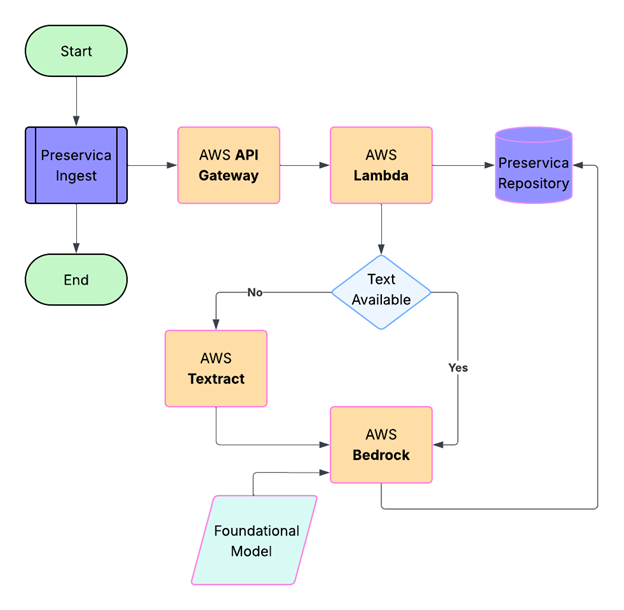
We have now specified all the services we require to build the application. The workflow is shown in the diagram below:
The Implementation
A user drops a digitised document into a Preservica folder using the simple drag and drop feature, the image is ingested normally and at the end of the ingest process the webhook is sent to the API Gateway as a HTTPS POST request, containing a JSON payload which includes the Preservica reference of the ingested document. Note, the document itself is not sent, only its internal Preservica ID.
The API Gateway then triggers the Lambda function passing the Preservica reference to a Python Lambda function.
The first part of the Lambda function queries Preservica to determine what kind of object has been ingested, if the object is an image it will need to be OCR’d first. We use the Python Imaging Library Pillow to create an image object from the Preservica bytestream.
This image object is then sent to AWS Textract which returns a text string.
The OCR text is also stored as descriptive metadata fragment on the Asset.
The following code snippet shows how we can use the pyPreservica SDK to retrieve the bitstream of the ingested document, create an image object and send it to Textract for OCR processing. The resulting text is then stored as a metadata fragment on the Asset.
TEXT_NS = "http://www.preservica.com/metadata/group/ai_ocr_text"

from pyPreservica import *
from textractor import Textractor

preservica_client = EntityAPI()

def text_extract(asset: Asset):
    extractor = Textractor(region_name="eu-west-1")
    for bs in preservica_client.bitstreams_for_asset(asset):
        if (bs.filename.lower().endswith("png")) or (bs.filename.lower().endswith("jpg")):
            image = Image.open(preservica_client.bitstream_bytes(bs))
            document = extractor.detect_document_text(file_source=image)
            xml_response = f"""<ai_ocr_text xmlns="{TEXT_NS}" xmlns:xsi="http://www.w3.org/2001/XMLSchema-instance">
                <text>{escape(document.text)}</text>
                </ai_ocr_text>"""
            preservica_client.add_metadata_as_fragment(asset, TEXT_NS, xml_response)
            return document.text
The OCR text is then combined with the prompt above and sent to a foundational model within Bedrock, the model analyses the text and returns the document summary. This summary is then written back into the description field of the Preservica Asset.
AWS Bedrock is Amazon Web Services’ fully managed generative AI platform that lets you build and scale AI applications using Foundation Models (FMs)—without managing any infrastructure. It provides access to many leading AI models (e.g., Amazon Titan, Anthropic Claude, Stability AI, Meta, Mistral, Cohere, etc.) through a single API.
Bedrock provides built‑in guardrails help block harmful content and reduce hallucinations, offering enterprise‑grade security and compliance.
The following code snippet shows how we can use the Boto3 library to send a request to Bedrock using the anthropic claude foundation model to generate a summary of the document text which can write the result back to Preservica.
def summarise_with_claude(text: str):

    client = boto3.client("bedrock-runtime", region_name="eu-west-1")

    model_id = "eu.anthropic.claude-sonnet-4-20250514-v1:0"

    prompt: str = "Summarise the following historical text into only two paragraphs: "

    # Format the request payload using the model's native structure.
    native_request = {
        "anthropic_version": "bedrock-2023-05-31",
        "max_tokens": 1024,
        "temperature": 0.5,
        "messages": [
            {
                "role": "user",
                "content": [{"type": "text", "text": prompt + text}],
            }
        ],
    }

    # Convert the native request to JSON.
    request = json.dumps(native_request)

    try:
        # Invoke the model with the request.
        response = client.invoke_model(modelId=model_id, body=request)

    except (ClientError, Exception) as e:
        print(f"ERROR: Can't invoke '{model_id}'. Reason: {e}")
        return ""

    # Decode the response body.
    model_response = json.loads(response["body"].read())

    # Extract and print the response text.
    response_text = model_response["content"][0]["text"]

    if prompt in response_text:
            response_text = response_text.replace(prompt, "")


    return response_text
The parameter temperature is set to 0.5, this controls the creativity of the response, lower values will produce more deterministic responses, while higher values will produce more creative responses.
The Results
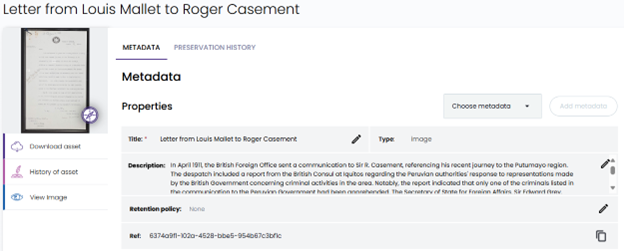
The following are the results of the AI workflow on two different digitised documents. The generated summary text returned from the model has been saved back into the description field of the Preservica Asset, this is then visible in the Preservica user interface as shown below.
Example 1
“Letter from Louis Mallet to Roger Casement”
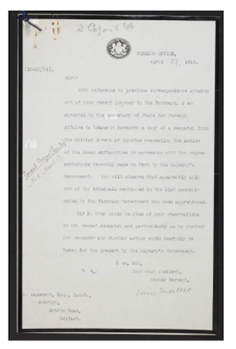
The AI generated description:
In April 1911, the British Foreign Office sent a communication to Sir R. Casement, referencing his recent journey to the Putumayo region. The despatch included a report from the British Consul at Iquitos regarding the Peruvian authorities’ response to representations made by the British Government concerning criminal activities in the area. Notably, the report indicated that only one of the criminals listed in the communication to the Peruvian Government had been apprehended. The Secretary of State for Foreign Affairs, Sir Edward Grey, sought Casement’s insights on the Consul’s despatch, specifically whether further action could be beneficially undertaken by the British Government at that time.
The Foreign Office’s communication underscored the limited progress made by Peruvian authorities in addressing the issues raised, prompting a call for Casement’s expert opinion on potential next steps. The correspondence highlights the ongoing concern and diplomatic efforts by the British Government to ensure justice and accountability in the Putumayo region.
How it appears in Preservica:
Example 2
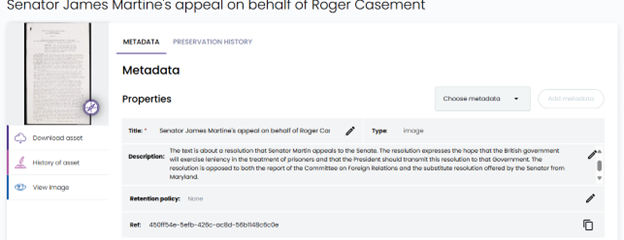
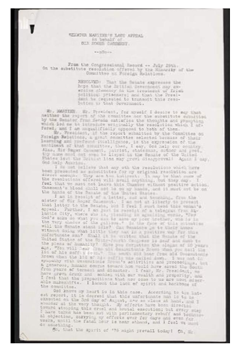
“Senator James Martine’s appeal on behalf of Roger Casement”
The AI generated description:
The text is about a resolution that Senator Martin appeals to the Senate. The resolution expresses the hope that the British government will exercise leniency in the treatment of prisoners and that the President should transmit this resolution to that Government. The resolution is opposed to both the report of the Committee on Foreign Relations and the substitute resolution offered by the Senator from Maryland.
How it appears in Preservica: